I’m Moses Gitari Johnson, the founder of NoteTell Money Reader. On 18 November 2026, Tomas Jelinek published a page called “NoteTell is just a copy of Cash Reader” [1]. This page answers it point by point, in the same order, except that I show the screens that differ most first. Each part quotes their words exactly, and my answer follows.
I have tried to be calm and factual. Where Cash Reader is right, I say so. Where the two apps are alike, I say that too. Every picture has a full text description, so a screen reader can tell you what’s in it. When two screens are compared, Cash Reader comes first, on the left, and NoteTell Money Reader second, on the right. They show Cash Reader as it was in November 2026, and NoteTell Money Reader 1.1.1, the version on the App Store now.
In short
- NoteTell Money Reader is my own independent work. I started it in 2026. I trained its recognition models with Apple’s own frameworks, from recordings of real banknotes. Almost all are my own recordings of notes I bought with my own money. For a few notes I couldn’t get, I used public online videos, and none of them came from Cash Reader.
- It does not use Cash Reader’s code, models, recordings or data. Being an ambassador never gave me any of them, and I have never used them, including from any version of Cash Reader I tested.
- I know Cash Reader well. I translated it into Swahili, and for years I was one of its paid ambassadors in Africa. I collected banknotes, promoted the app and tested new versions. I was never an employee.
- Some things in the two apps really are alike, and I list them below. The main screen is the closest match. I used Cash Reader as a reference for it, but not its code or images.
- Several sentences in my App Store text and website were too close to Cash Reader’s, and one was word for word. I reworded the App Store description in version 1.1.1, and I will reword the rest.
- I should have told Tomas myself that I was building NoteTell Money Reader before I released it. I didn’t, and I’m sorry.
- Every currency is built into NoteTell Money Reader, so nothing is downloaded; Cash Reader downloads its currencies after you install it. NoteTell Money Reader also reads the Angolan kwanza, which Cash Reader lists as not yet supported.
- NoteTell Money Reader was not available in the Czech Republic at launch. It has been available there since 17 November, and today it is available in every country except mainland China.
- NoteTell Money Reader works without an internet connection. It stays on the App Store, and I will keep updating it.
Their title and opening
“NoteTell is just a copy of Cash Reader”
“Last updated: 18 November 2026”
“This is our statement about the NoteTell copycat app.”
My answer: NoteTell Money Reader is not a copy of Cash Reader. It has its own code, its own recognition models trained from recordings of real banknotes, almost all my own, its own name and icon, and its own design built on Apple’s standard controls. Some features and some sentences were alike, and I explain each one below.
Tomas’s statement
“My name is Tomas Jelinek. In 2018, a colleague and I created Cash Reader, one of the first apps to use neural networks on a phone for fast offline banknote recognition. We’ve put thousands of hours of work into Cash Reader, and today it’s one of the most trusted apps, used by blind people all over the world.”
My answer: I agree that Cash Reader is a trusted app built with years of work, and I do not dispute that it was one of the first apps of its kind. I spent years helping it grow. Money readers existed before it: the U.S. Bureau of Engraving and Printing released EyeNote on the App Store in 2011, and it worked on the phone with no data connection [2][3][5]. LookTel Money Reader also read bills on the iPhone in 2011 without an internet connection [6]. Microsoft’s Seeing AI added currency recognition in December 2017 [10].
“We recently learned about a new competing app, NoteTell. We welcome competition, and we regularly work with many other app makers, even though our businesses often overlap.”
My answer: I welcome that. People who are blind or have low vision benefit from having more than one choice.
“Unfortunately, NoteTell isn’t competition. It’s a blatant AI copy. Its author simply got an AI to copy Cash Reader, screen by screen. Here and there, the AI changed a color or reworded some text.”
My answer: NoteTell Money Reader was not copied screen by screen. Their own page says of the main screens: “The colors and the typeface differ.” The other screens differ much more. NoteTell Money Reader uses Apple’s standard grouped lists, switches and checkmarks, while Cash Reader uses its own white-outlined boxes. The screens below show the biggest differences: Settings, the currency choice and the vibration page.
Settings
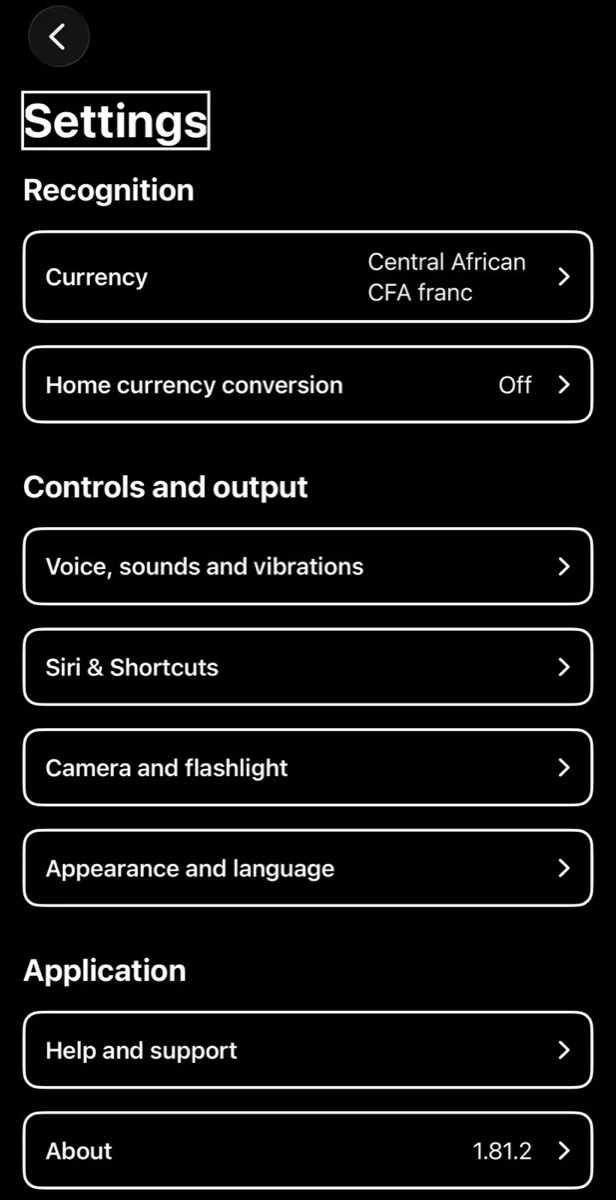
Cash Reader 1.81.2, on my iPhone, November 2026.
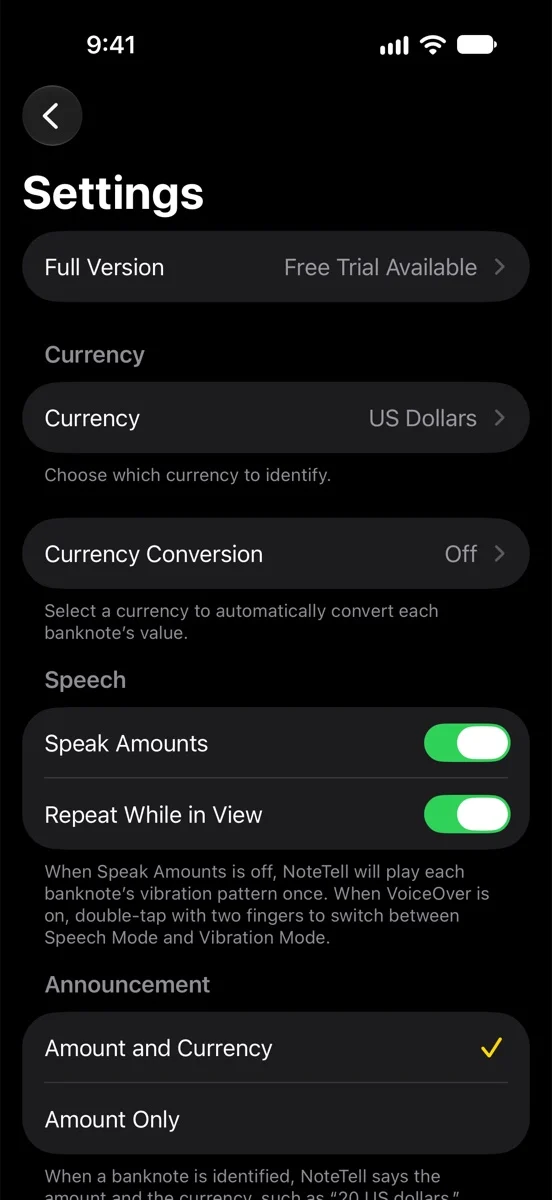
NoteTell Money Reader 1.1.1, in Apple’s iPhone simulator, November 2026.
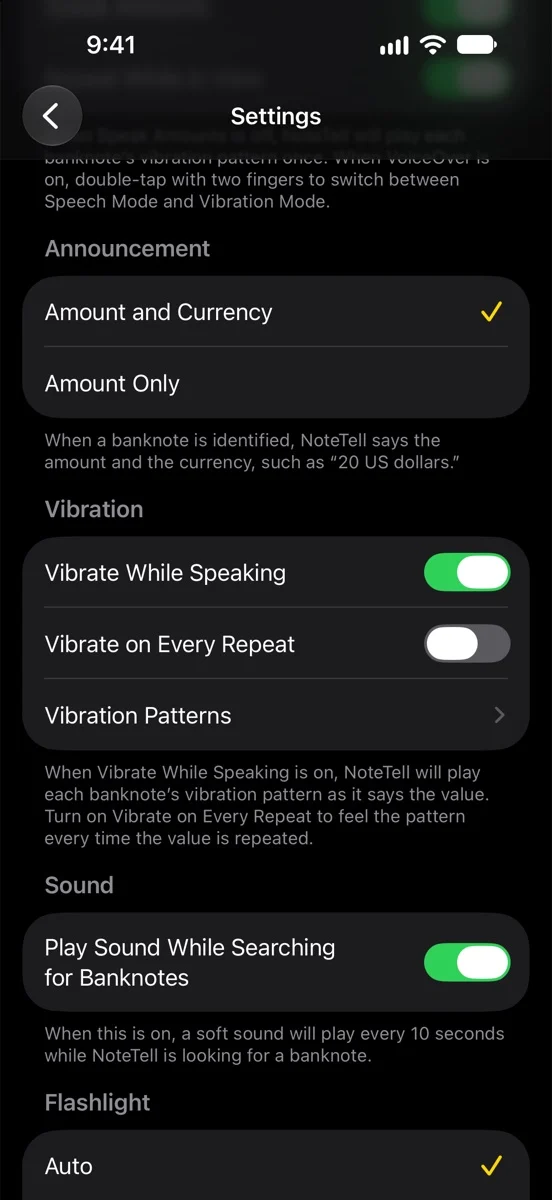
NoteTell Money Reader 1.1.1, in Apple’s iPhone simulator, November 2026.
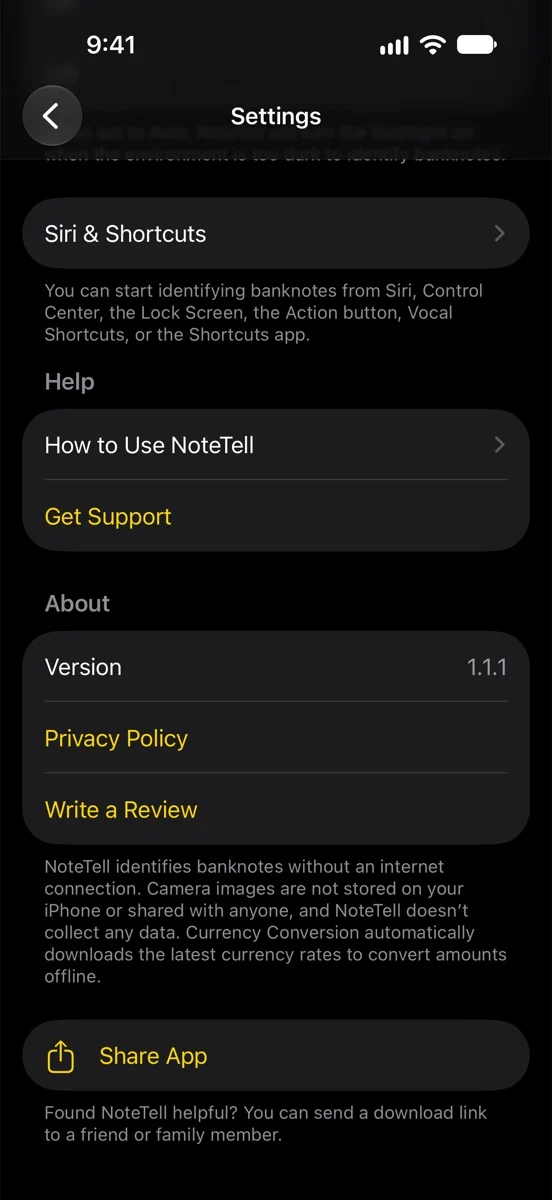
NoteTell Money Reader 1.1.1, in Apple’s iPhone simulator, November 2026.
Cash Reader groups its settings into pages such as “Voice, sounds and vibrations” and “Camera and flashlight”. NoteTell Money Reader keeps its settings on one Apple-style list, with an explanation under each group. The names, wording, order and look are different.
Choosing a currency
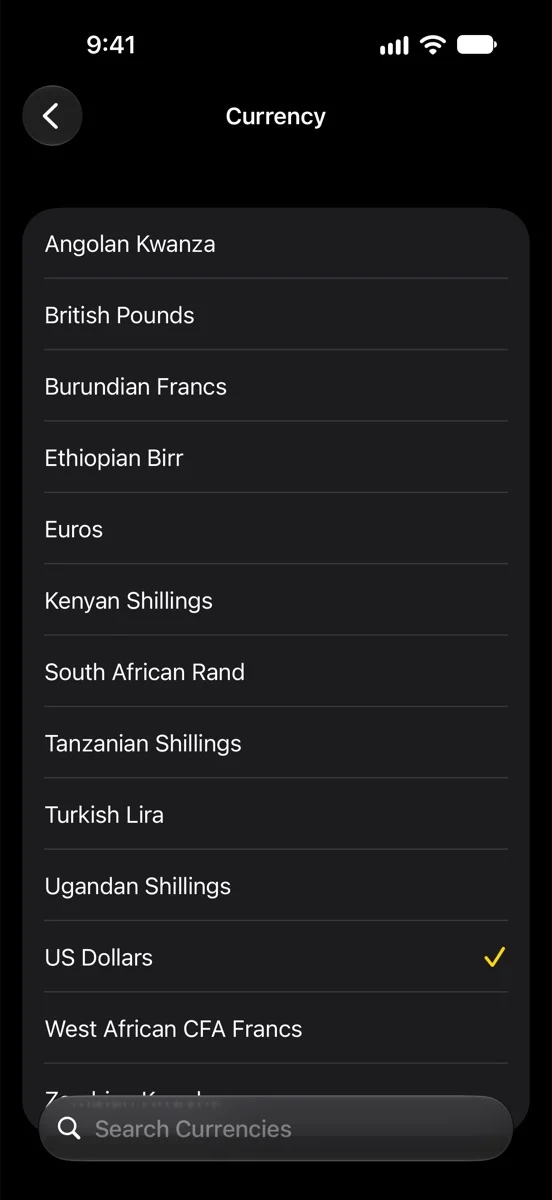
NoteTell Money Reader 1.1.1, in Apple’s iPhone simulator, November 2026.
On my iPhone, Cash Reader’s currency screen, “Select currency”, has a “Multiple currencies” button, a list of downloaded currencies, and currencies to download grouped by continent. NoteTell Money Reader has a plain alphabetical list with a search field. You choose one currency at a time, and every supported currency is built into the app, so there is nothing to download. It also reads the Angolan kwanza, which Cash Reader’s currencies page lists as not yet supported [18].
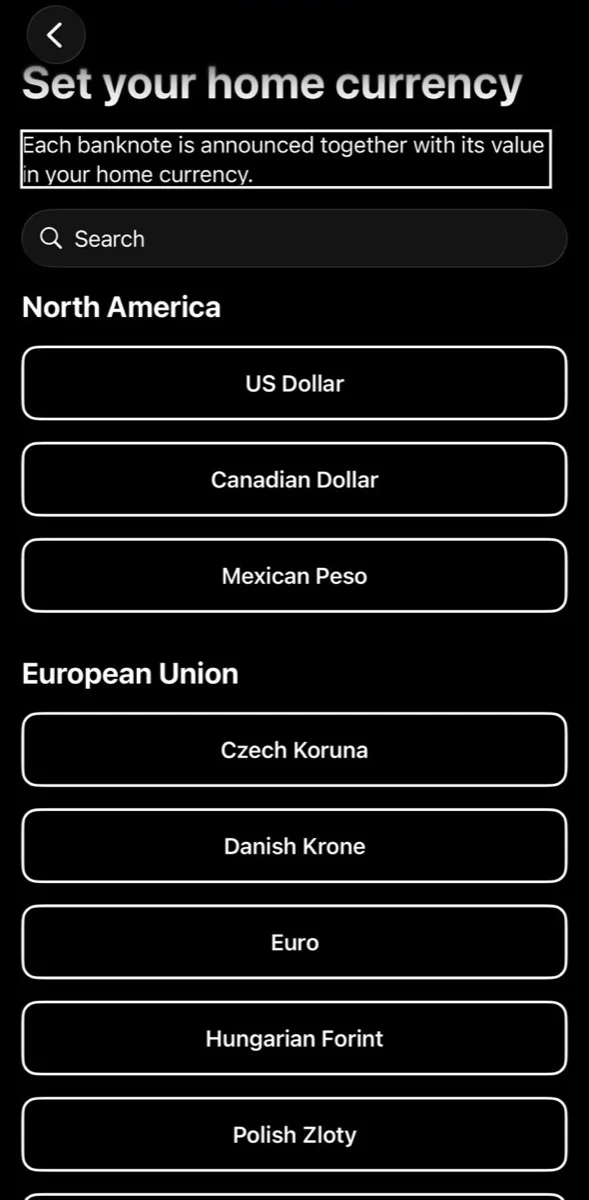
Cash Reader 1.81.2, on my iPhone, November 2026.
For home currency conversion, Cash Reader lists currencies by continent as outlined buttons. NoteTell Money Reader’s Currency Conversion screen is a standard Apple list: Off at the top, a Suggested currency, and Other Currencies in alphabetical order with a search field.
The vibration page
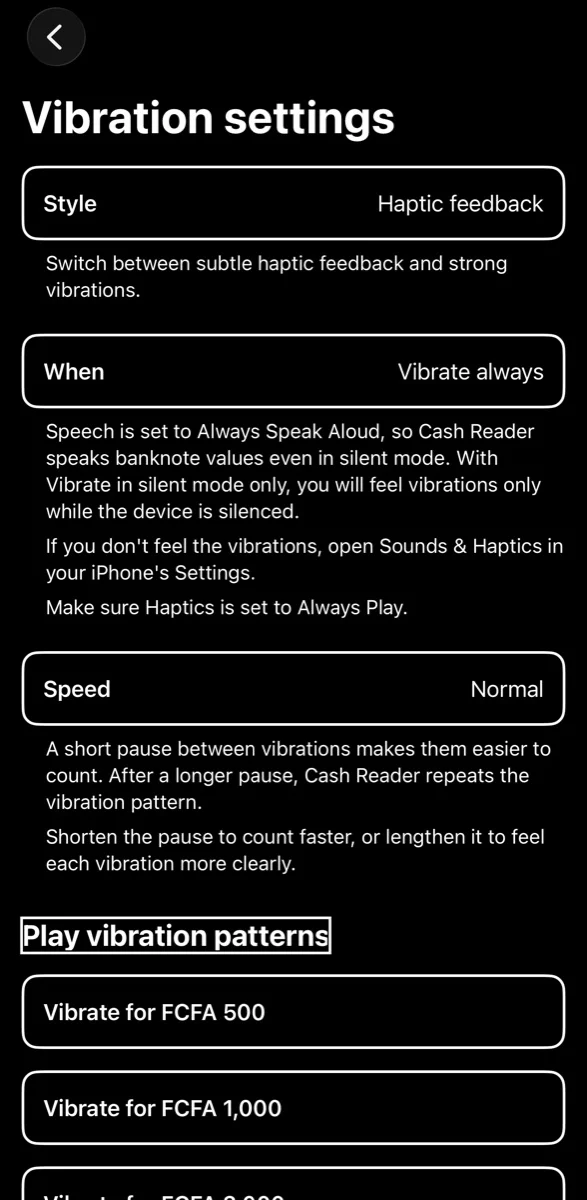
Cash Reader, on my iPhone, November 2026.
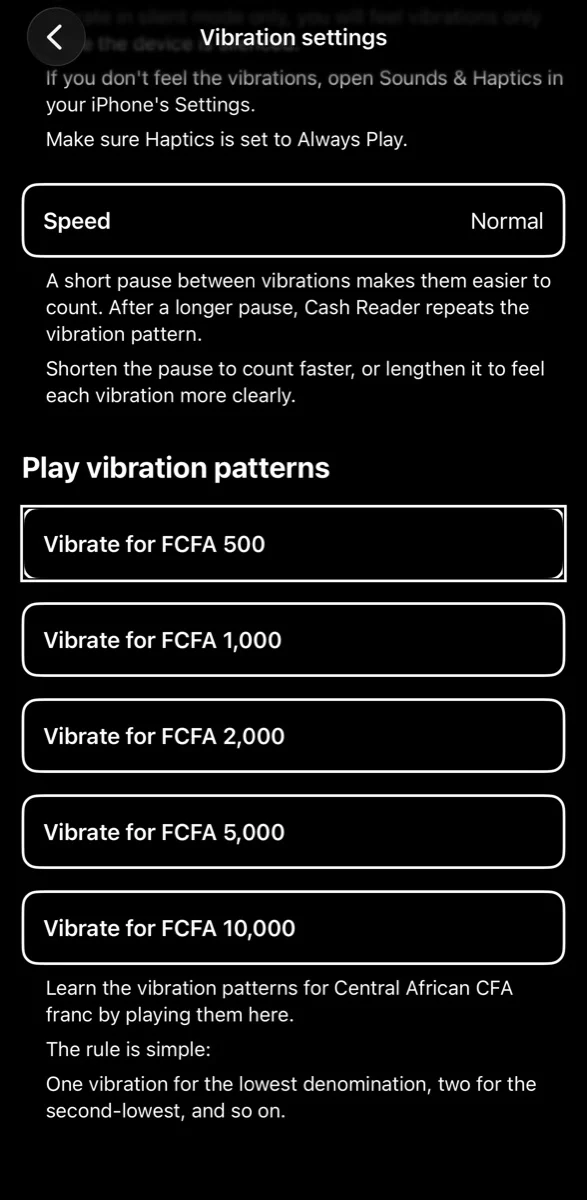
Cash Reader, on my iPhone, November 2026.
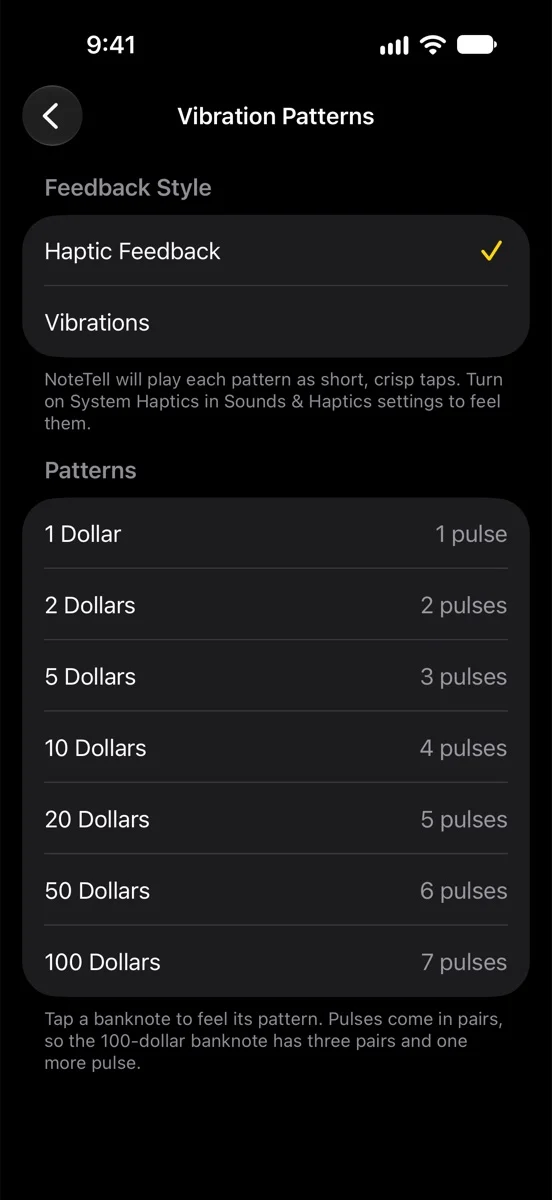
NoteTell Money Reader 1.1.1, in Apple’s iPhone simulator, November 2026.
The idea is the same in both apps: one pulse for the lowest note and one more for each higher note, a choice between gentle haptic taps and stronger vibrations, and a list where you can feel each pattern. The counted pulses are older than both apps, as I explain under their vibration section below, and the choice of haptic style follows Apple’s own guidelines [15]. The pages themselves are different. Cash Reader has a speed setting and a silent-mode choice. NoteTell Money Reader has neither, and instead shows the number of pulses next to every note and explains how the pulses are grouped.
Siri & Shortcuts
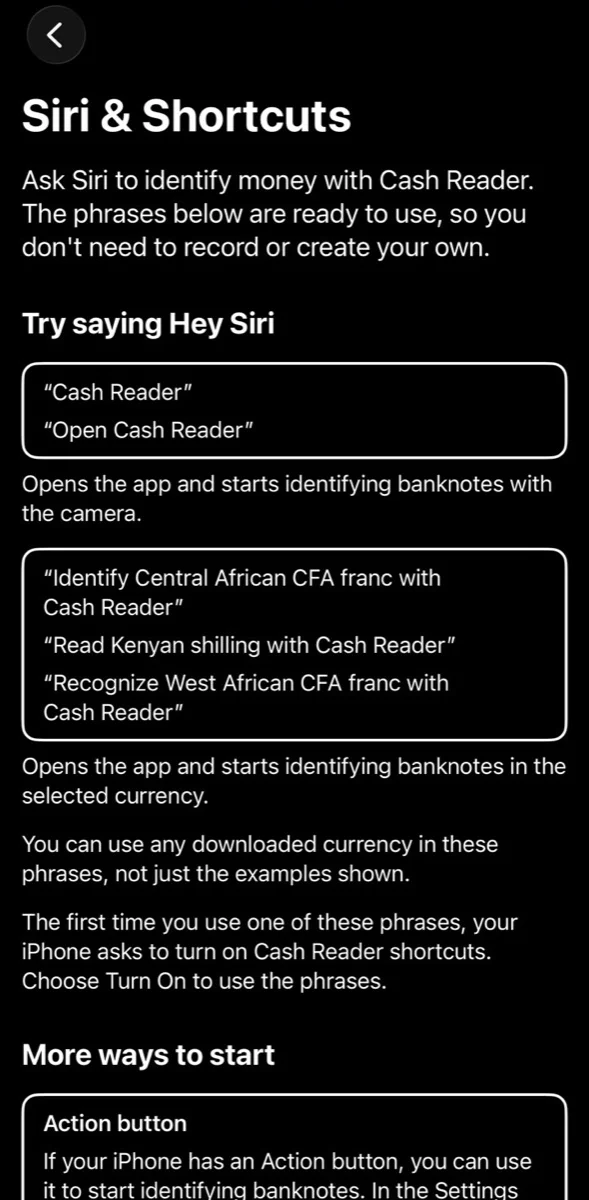
Cash Reader 1.81.2, on my iPhone, November 2026.
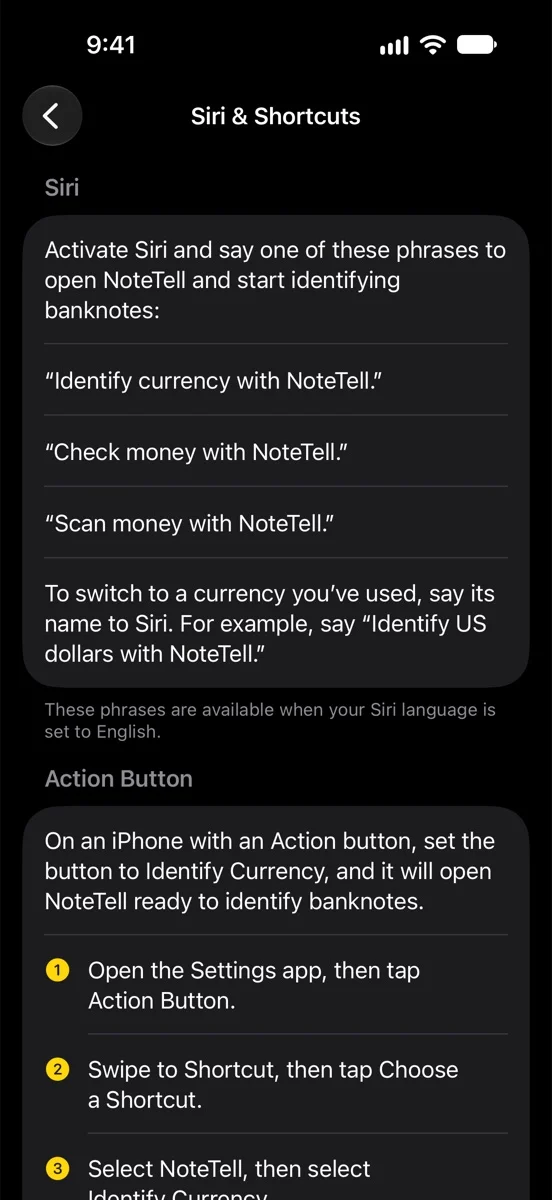
NoteTell Money Reader 1.1.1, in Apple’s iPhone simulator, November 2026.
Siri phrases that work without recording, and controls for Control Center, the Lock Screen and the Action button, are Apple features offered to every app [12][13]. The page layout, the steps and most of the wording are different. NoteTell Money Reader also gives numbered steps for Vocal Shortcuts, an Apple accessibility feature [14].
“We’ve always faced piracy, but AI clones are worse, because they’re distributed through official channels and it’s hard to prove that they’re clones. With NoteTell, it wasn’t hard.”
My answer: I agree that piracy harms developers. NoteTell Money Reader is not a clone. It contains no code, models, recordings, images or data from Cash Reader.
“Below you’ll find our comparison, which shows that the author copied even small details, such as the small caret at the end of the title button on the main screen.”
My answer: The small caret is Apple’s standard chevron. iOS uses it on buttons and rows that open another screen, as on many of the NoteTell Money Reader screens above. I answer the main screen in full under their first section below.
“We knew this would happen. But what makes us unique is the training of our recognition models, which we’ve been improving for years, on a huge number of photos of real banknotes.”
My answer: I agree that Cash Reader’s trained models are its own. NoteTell Money Reader does not have them. Its models are my own, trained with Apple’s frameworks from recordings of real banknotes, almost all my own.
“But the saddest part of the story lies elsewhere. As we soon found out, this clone was made by our longtime colleague Moses Gitari from Kenya. Early on, Moses contacted us because he wanted to translate Cash Reader into Swahili, and after that we worked together for years.”
My answer: I made NoteTell Money Reader. It is not a clone. It’s true that I contacted Cash Reader to translate it into Swahili and that we worked together for years. I was a translator, an ambassador and a tester, never an employee.
“So he was in a small group of ambassadors who had access to all of our company’s know-how.”
My answer: I did not have access to all of it. Being an ambassador never gave me Cash Reader’s code, models, recordings or data, and I have never used them. Cash Reader’s own About page describes what ambassadors do: they “help with translations, collect banknotes, and spread the word” [17].
“He was always paid for his work, even at times when we had almost no income. Later, because he was our friend, we even paid for his university studies, so that he could make his way in Kenya, find a good job and have a better life.”
My answer: I was Cash Reader’s paid ambassador, with a small monthly fee in the early years. After that, I still helped when they asked. I have already offered to return the money Tomas gave to help with my school fees.
“That’s why this was completely shocking and incomprehensible to us. He copied the whole app and, without our knowledge, released it on the App Store at half the price.”
My answer: I understand why it was a shock. I should have told Tomas myself that I was building NoteTell Money Reader before I released it. I didn’t, and I’m sorry. But I did not copy the whole app. On price: NoteTell Money Reader is currently sold as one purchase of US$14.99. Cash Reader’s App Store page lists a lifetime purchase of US$39.99, and also yearly and monthly subscriptions [16]. Each developer sets its own price.
“Despite the know-how he gained with us, his recognition model comes nowhere near the quality of Cash Reader.”
My answer: Cash Reader has years of work behind it and many more currencies. This sentence also confirms that the two apps’ recognition models are different. NoteTell Money Reader’s models are my own. Anyone can try it free and decide for themselves.
“But in the end, the price may win users over, and all the other features, which we spent years refining with the community, he simply copied, shamelessly.”
My answer: Many of the shared features are older than Cash Reader, or are Apple’s own features:
- Hearing a note’s value spoken aloud: the Note Teller 2 talking device in 2007 [9], and EyeNote and LookTel Money Reader on the iPhone in 2011 [2][6].
- Working on the phone without an internet connection: EyeNote and LookTel Money Reader in 2011 [5][6].
- Giving the value as counted pulses: the iBill identifier, reviewed in 2010, gave a $1 bill one pulse and a $2 bill two [7][8]. EyeNote offered a vibration pulse mode for privacy [4][5].
- Control Center, the Lock Screen, the Action button and Siri phrases: Apple offers these to every app [12][13].
- A free trial: Apple’s App Review Guidelines describe an “XX-day Trial” [11].
The two apps also differ in many features. NoteTell Money Reader turns on the flashlight in the dark and says “Flashlight on”, warns you when the camera lens needs cleaning, uses central-bank conversion rates and shows their date, reads the Angolan kwanza, and has the App Store privacy label “Data Not Collected”. Cash Reader has things NoteTell Money Reader doesn’t, including several currencies at once, sending photos, color themes, the front camera and many more currencies.
“Because of this, we have of course ended all cooperation with Moses, and we’ve reported NoteTell to Apple for breaking App Review Guideline 4.1, Copycats.”
My answer: I understand their decision to end our work together. If Apple reviews the complaint, I will answer it fully and give Apple the dated history.
“Before we manage to get the app removed from the App Store, many people may buy it. It will keep working for them after that, but it won’t get any more updates, so people who paid for it as a lifetime purchase will lose out, and they’ll surely be disappointed.”
My answer: NoteTell Money Reader is my own independent work, so it stays on the App Store, and I will keep updating it. Version 1.1.1 is already on the App Store [19], and everyone who buys the app will continue to be supported.
“That’s why we also want to use this page to warn people about the unfair practices of Moses Gitari and his company.”
My answer: I understand that they are upset. On this page I have tried to show what I did, what I got wrong, and what I have changed, so readers can judge for themselves.
“Below you’ll find screenshots comparing Cash Reader with NoteTell, and evidence that connects this app to our former ambassador. In his defense, Moses claims that the whole app is his “own independent work”, but we believe the comparisons below disprove that.”
My answer: I made NoteTell Money Reader, and the public pages they cite are correct about that. I do say it is my own independent work. Their comparisons show shared ideas and some close sentences. They do not show copied code, images, recordings, models or data, because there are none.
“Tomas Jelinek, founder of Cash Reader”
“The rest of this page is a catalogue of evidence and comparisons. Parts of it were prepared with the help of AI, but always from real screenshots of the NoteTell app or from information available on the web.”
My answer: My answer follows their sections in order.
Their section 1: The two apps side by side
“Here are the two apps next to each other. Every picture has a full text description, so a screen reader can tell you what’s in it.”
My answer: Thank you. My pictures have full descriptions too.
The main screen
“The same main screen”
“This is the main screen of each app while it reads a 10 pound note. We’ve numbered five details that are the same in both.”
Their picture description: “The two main screens side by side, with five matching details circled and numbered. Cash Reader on the left, since 23 September 2026. NoteTell on the right, released 7 November 2026. 1: the same title, Identifying British pound in Cash Reader and Identifying British Pounds in NoteTell. 2: the same caret after the title, as on a button. In Cash Reader it opens the currency choice. 3: the value, 10, in very large digits over the dimmed camera image. 4: the currency name in large letters below it. 5: one full-width Settings button at the bottom, and no other controls. The colors and the typeface differ.”
Their caption: “Cash Reader on our iPhone on the left, NoteTell from a screenshot on its UK App Store page on the right, both November 2026. We added the circles and numbers.”
My answer: This is the closest match between the two apps, and I said so on AppleVis. A title with a small arrow, a very large value, the currency name and one Settings button is a natural layout for an app with one task: one large result and one way to change settings. I used Cash Reader as a reference for this screen, but not its code or images.
On the five details:
- The title. NoteTell Money Reader’s title used to read “Identifying …”, as Cash Reader’s does. In version 1.1.1 it changed to “Currency: …”. The App Store screenshots they used still show the old title. I will replace them in the next version.
- The caret. It is Apple’s standard chevron for a control that opens another screen. 3 and 4. The large value with the currency name below it is a natural way to show an amount and its unit.
- One Settings button. A single-task app has little else to put on its main screen.
As their own description says, the colors and the typeface differ.
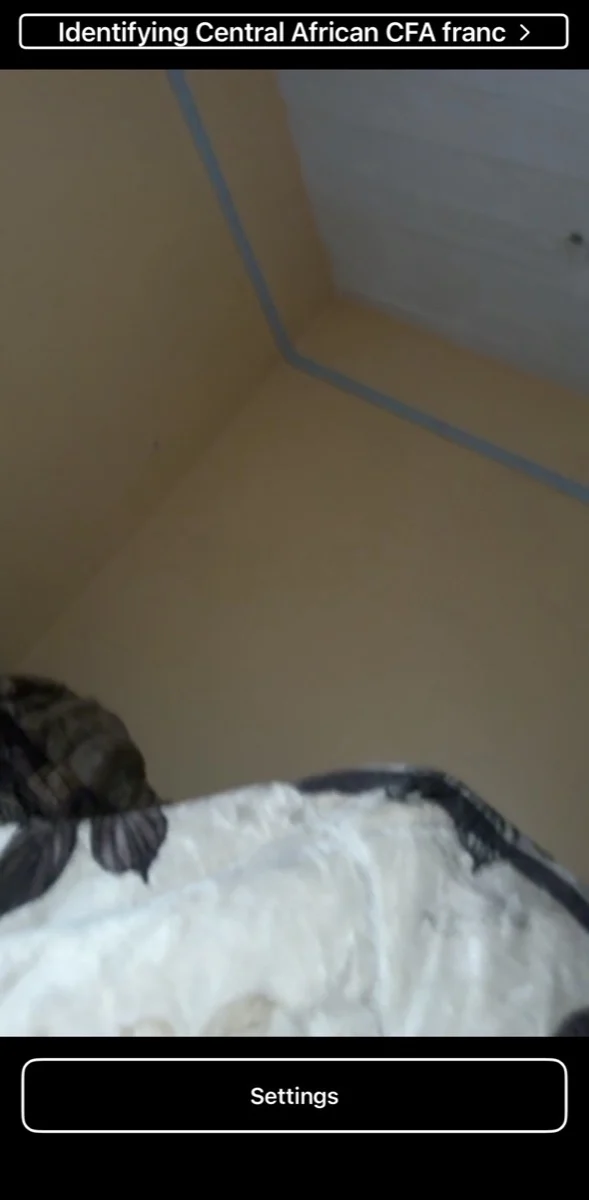
Cash Reader 1.81.2, on my iPhone, November 2026.
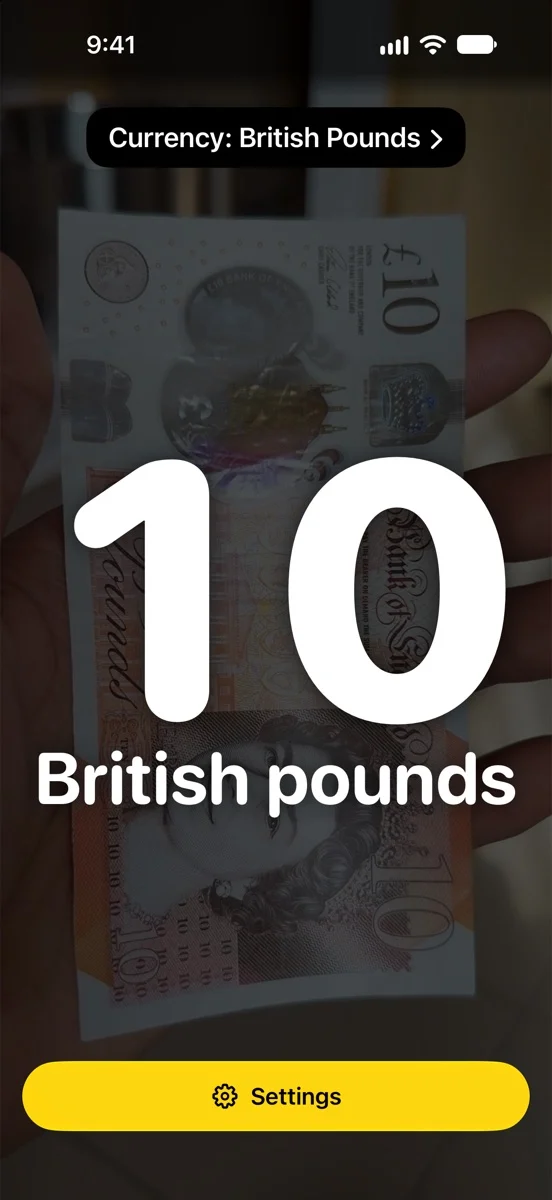
NoteTell Money Reader 1.1.1, in Apple’s iPhone simulator, November 2026. The simulator has no camera, so a still frame from my own recording of a 10 pound note is placed behind the app. Everything on top of it is the app’s own screen, unchanged.
With currency conversion
Their picture description: “Cash Reader’s main screen converting a 10 euro note to pounds. Under the very large 10 and the word Euro, a line and then the converted value, 8,30 £.”
Their caption: “Cash Reader on our iPhone, November 2026.”
Their picture description: “NoteTell’s main screen in its App Store screenshot, converting a 20 euro note to pounds. As in Cash Reader, the converted value sits under the large value and the currency name: 20, euros, About 16.71 British pounds. NoteTell writes it in words, with no line above it.”
Their caption and source: “NoteTell, from a screenshot on its UK App Store page, November 2026. Source: Web Archive copy of NoteTell’s UK App Store page, 17 November 2026”
My answer: A converted amount naturally goes under the amount it converts. The rest is different, as their own description says: NoteTell Money Reader writes the converted amount in words, starting with “About”, with no line or currency symbol. It uses central-bank rates and shows their date, and Currency Conversion is off until you turn it on in Settings.
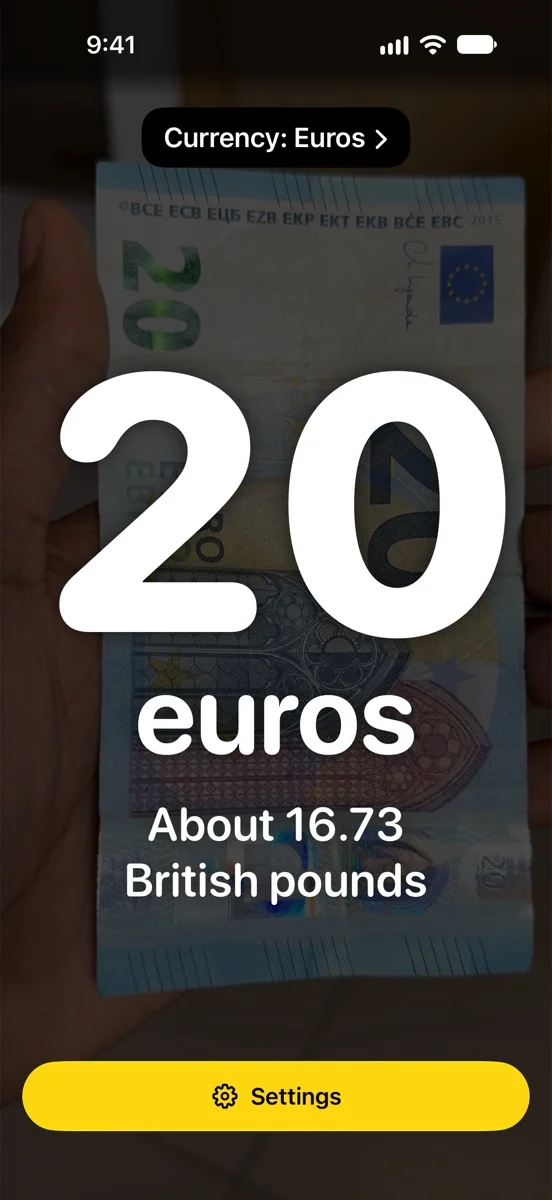
NoteTell Money Reader 1.1.1, in Apple’s iPhone simulator, November 2026, with a still frame from my own recording of a 20 euro note behind the app.
The vibration code
“The same vibration code, played in pairs”
“Since 2018 Cash Reader has used this vibration code: the lowest note gets one pulse and each higher note gets one more, so $100 gets seven. It has played the pulses in pairs since at least 2019, and we never wrote that down anywhere. NoteTell’s screen lists the same code and also says the pulses come in pairs.”
Their picture description: “Cash Reader’s Vibration settings screen. Seven buttons, Vibrate for $1 up to $100, play each note’s pattern, and the text below gives the rule: One vibration for the lowest denomination, two for the second-lowest, and so on.”
Their caption: “Cash Reader 1.81.2 in the iPhone simulator, November 2026.”
Their picture description: “NoteTell’s Vibration Patterns screen. As in Cash Reader, it lists the seven dollar notes from 1 to 100 dollars, and you tap a note to feel its pattern. Unlike Cash Reader, it shows 1 to 7 pulses next to them, and the note below says: Pulses come in pairs, so the 100-dollar banknote has three pairs and one more pulse.”
Their caption: “NoteTell on our iPhone, November 2026.”
My answer: Telling banknotes apart by counting pulses is older than Cash Reader. The iBill identifier, reviewed in 2010, gave a $1 bill one pulse, a $2 bill two and a $5 bill three [7][8]. EyeNote offered a vibration pulse mode for privacy [4][5]. One more pulse for each higher note is the simplest rule a person can count, and listing the currency’s notes is the obvious way to practise it.
The paired pulses are alike in both apps, as I said on AppleVis. Grouping pulses makes them easier to count, and I built NoteTell Money Reader’s grouping and its own timing myself. As their description says, NoteTell Money Reader also shows the number of pulses next to each note, which Cash Reader does not. The two vibration pages are shown in full near the top of this page.
A sound every 10 seconds while searching
“A sound every 10 seconds while searching”
“Since January 2025 Cash Reader has beeped every 10 seconds while it identifies banknotes, and we don’t mention that interval in any of our texts. NoteTell’s settings say a soft sound plays every 10 seconds while it looks for a banknote.”
Their picture description: “Cash Reader’s Voice, sounds and vibrations screen. Next to the announcement and vibration settings is the switch Beep while identifying, here off. Its note says a periodic beep lets you know that Cash Reader is active and identifying banknotes, and gives no interval.”
Their caption: “Cash Reader 1.81.2 in the iPhone simulator, November 2026.”
Their picture description: “NoteTell’s Settings screen, lower part, with the same kind of switch next to its announcement and vibration settings: Play Sound While Searching for Banknotes, here on. Its note says a soft sound will play every 10 seconds while NoteTell is looking for a banknote.”
Their caption: “NoteTell on our iPhone, November 2026.”
My answer: Both apps can play a sound while they search, as I said on AppleVis. NoteTell Money Reader’s plays every 10 seconds, and it works differently. It is a soft water-drop recording, not a beep. It plays only after 10 quiet seconds with no banknote in view, only in Speech Mode, and it follows the iPhone’s Silent switch. Cash Reader’s beep, as its own note says, also helps you avoid leaving the app running, because identification uses a lot of battery. I wrote the code for it myself. The sound is a public-domain recording of a water drop, from Freesound.
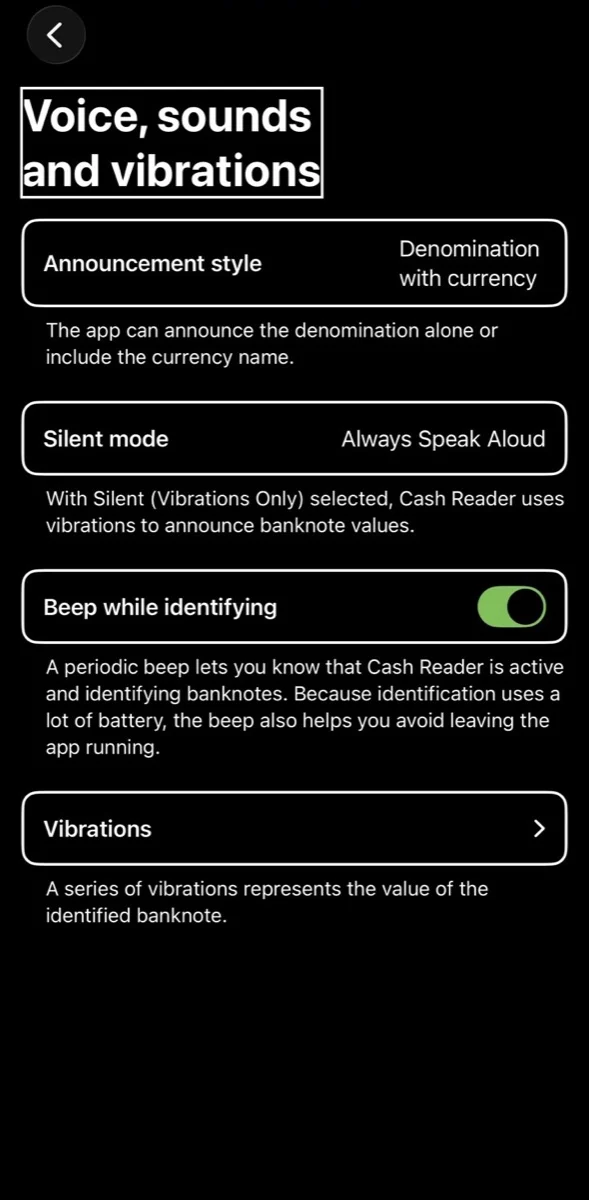
Cash Reader 1.81.2, on my iPhone, November 2026. NoteTell Money Reader’s matching settings are in the second Settings picture near the top of this page.
Three ideas exist in both apps: the amount with or without the currency name, vibration instead of speech, and a sound while searching. The names, wording, layout and behavior differ. NoteTell Money Reader also has Repeat While in View, a list of pulse counts you can tap to feel, a two-finger double-tap to switch between Speech Mode and Vibration Mode, and a flashlight that is announced aloud.
The free notes
“The same free notes, $1, $2 and $5”
“Since 2018 Cash Reader has identified $1, $2 and $5 bills for free and offered a 14-day free trial. NoteTell says it does both. In the US App Store in November 2026, our lifetime license cost $39.99 and NoteTell’s full version cost $14.99.”
Their picture description: “Cash Reader’s main screen in the free version. Above the Purchase the Full version and Settings buttons, one line says: The Free version identifies only $1, $2, $5.”
Their caption: “Cash Reader 1.81.2 in the iPhone simulator, November 2026. The simulator has no camera, so the middle is black.”
Their picture description: “NoteTell’s Full Version screen. It names the same three bills as free, on a separate screen with its trial and price: NoteTell identifies 1, 2, and 5 dollar bills for free, offers the full version free for 14 days, and after the trial limits it to those bills again. The full version costs USD 14.99 as a one-time purchase.”
Their caption and sources: “NoteTell on our iPhone, November 2026. Sources: Web Archive copy of Cash Reader’s US App Store page with the $39.99 lifetime price, 17 November 2026. Web Archive copy of NoteTell’s US App Store page with the $14.99 price, 17 November 2026”
My answer: Yes, both apps do this, and Cash Reader offered a free trial before NoteTell Money Reader did. I made the $1, $2 and $5 bills free so people can check the app with their own money first. A trial of a set number of days is a standard App Store offer; Apple’s guidelines call it an “XX-day Trial” [11]. The prices they quote are correct for that day. NoteTell Money Reader is currently sold as one purchase.
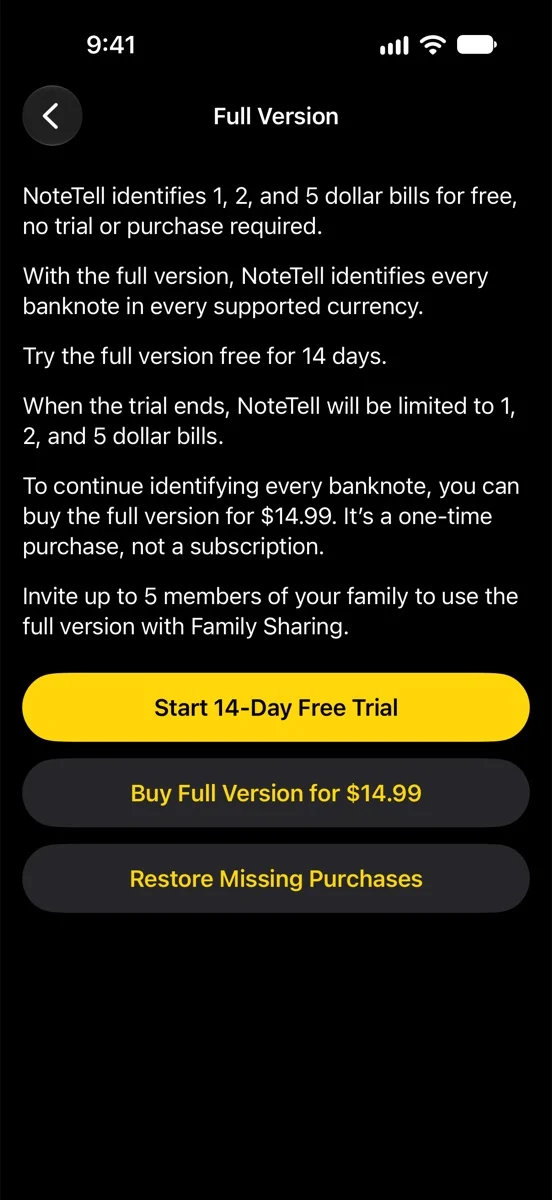
NoteTell Money Reader 1.1.1, in Apple’s iPhone simulator, November 2026. The price shown is the US App Store price.
Their section 2: Who is behind NoteTell
“You don’t have to take our word for who is behind NoteTell. Public pages connect the app and its seller, GeeksModo Limited, to Moses Gitari.”
“NoteTell’s seller is GeeksModo Limited”
“NoteTell’s App Store page lists GeeksModo Limited as the seller. It’s the only app that seller has in the US and UK App Stores. Version 1.0 came out in November 2026.”
Their sources: “Web Archive copy of NoteTell’s US App Store page, 17 November 2026. Web Archive copy of Apple’s public app data for NoteTell (seller name and release date), 17 November 2026. Web Archive copy of Apple’s list of the seller’s apps in the US App Store, 17 November 2026. Web Archive copy of Apple’s list of the seller’s apps in the UK App Store, 17 November 2026”
My answer: All of this is correct. The App Store page names my company as the seller. GeeksModo Limited is my company, and it publishes NoteTell Money Reader. NoteTell Money Reader is its only app, and version 1.0 came out on 7 November 2026.
“A Paths to Literacy profile calls Moses Gitari the founder of NoteTell”
“Paths to Literacy, a website of Perkins School for the Blind, has a profile of Moses Gitari. It calls him the founder of NoteTell Money Reader and says he runs the tech blog GeeksModo. The “Email Moses” button on that profile opens [email protected]. That’s the Cash Reader address we set up for him in February 2019.”
Their source: “Web Archive copy of Moses Gitari’s profile on Paths to Literacy, 17 November 2026”
My answer: This is correct. The email address on that profile is the one Cash Reader set up for my ambassador work, and I no longer have access to it. To reach me about NoteTell Money Reader, please write to support@notetell.com.
“GeeksModo names Moses Gitari as its Editorial Director”
“GeeksModo’s About page calls Moses Gitari its Editorial Director and says he runs GeeksModo and gives it business direction. The footer of the site names GeeksModo Limited as the copyright holder.”
Their sources: “Web Archive copy of GeeksModo’s About page, 17 November 2026. Web Archive copy of GeeksModo’s home page, with its footer, 17 November 2026”
My answer: Correct.
Their section 3: Moses Gitari worked with Cash Reader
“Our About page listed him as an ambassador”
“Our About page lists Moses Gitari from Kenya among our global ambassadors, and has since at least January 2026. Ambassadors help with translations, collect banknotes and spread the word. He was still on the list when we published this page.”
Their sources: “Web Archive copy of Cash Reader’s About page, 13 January 2026, before NoteTell existed. Web Archive copy of Cash Reader’s About page, 17 November 2026”
My answer: Correct, their About page still listed me. I was Cash Reader’s paid ambassador, with a small monthly fee in the early years, and after that I still helped when they asked. Their own description of ambassadors is translations, banknotes and spreading the word. It does not include Cash Reader’s code, models or data.
“He had a Cash Reader email address”
“We set up [email protected] for him in February 2019. It’s the contact address on his Paths to Literacy profile.”
Their source: “The Paths to Literacy profile, earlier on this page”
My answer: Correct. I answered this above.
“What he did for Cash Reader”
“Moses translated Cash Reader into Swahili in December 2018 and updated the translation in 2019 and 2020. Cash Reader has been available in Swahili since January 2019.”
My answer: Correct. I was glad to do it.
“From 2019 he was our paid ambassador for Africa. He bought banknotes for us in several African countries and arranged for other notes to be filmed, so Cash Reader could learn to recognize them.”
My answer: Yes. I was Cash Reader’s paid ambassador, with a small monthly fee in the early years, and after that I still helped when they asked, including with banknotes. I was proud to help Cash Reader read African currencies.
“He was also one of our testers, from January 2019 until November 2026. Through Apple’s TestFlight he could install new versions of Cash Reader before we released them.”
My answer: Yes. I tested new versions of Cash Reader for years, as I said on AppleVis. I never used code, models, recordings or data from any version I tested.
“We paid him every month from 2019 to 2023, and after that for smaller tasks.”
My answer: I was Cash Reader’s paid ambassador, with a small monthly fee in the early years. After that, I still helped when they asked.
“All of this is our own statement. We have the emails, invoices and messages behind it, and we don’t publish them because they contain personal details.”
My answer: I won’t publish private messages either.
Their section 4: The details, with sources
“This part is for readers who want to check everything themselves. We compare our own texts with NoteTell’s App Store page and website, and every claim links to a dated copy in the Web Archive.”
My answer: Their Web Archive copies are from 17 November 2026, before version 1.1.1 reached the App Store with a reworded description. I give the current wording for each pair below.
The same kind of free version
“Since version 1.4 (2 July 2018), Cash Reader for iPhone has offered a 14-day trial of the full version with no payment. After it, the app returns to the free version, which still identifies the lowest notes of each currency (for most currencies the two lowest, for US dollars the $1, $2 and $5 bills). From April to October 2018 (versions 1.0 to 1.15), Cash Reader’s App Store description named “1, 2, 5 US Dollars” as free.”
“NoteTell’s website describes the same design. It says the 14-day trial is free, that there is no charge when it ends, and that afterwards US $1, $2 and $5 bills and the two lowest notes of every other currency stay free. Unlike Cash Reader, NoteTell sells no subscription.”
“Among about 40 banknote apps whose public descriptions we reviewed on 16 November 2026, only Cash Reader and NoteTell describe this combination.”
Their sources: “Web Archive copy of NoteTell’s home page, 17 November 2026. Web Archive copy of NoteTell’s support page, with the question “What can I do with the free version?”, 17 November 2026. Web Archive copy of NoteTell’s US App Store page, 17 November 2026″
My answer: Yes, the free version works the same way in both apps, and Cash Reader did it first, as I said above. “No charge when it ends” is simply how a trial that isn’t a subscription works on the App Store [11]. They are also right that NoteTell Money Reader currently sells no subscription.
Two details we never wrote down
“Cash Reader’s vibration pulses have come in pairs since at least 2019, and its optional sound has played every 10 seconds since version 1.69 in January 2025. But we never wrote either detail down anywhere.”
“NoteTell’s App Store page and website say its vibration pulses also come in pairs, to make them easier to count. Its accessibility page says a soft sound also plays every 10 seconds while the app looks for a banknote.”
“Anyone who uses Cash Reader can notice them, and Moses used and tested it for years.”
Their sources: “Web Archive copy of NoteTell’s home page, 17 November 2026. Web Archive copy of NoteTell’s US App Store page, 17 November 2026. Web Archive copy of NoteTell’s accessibility page, 17 November 2026”
My answer: I agree that anyone who uses Cash Reader can notice them, and I have said openly that these two behaviors are alike. I answered both in full above, under the vibration code and the 10-second sound.
Our sentences, reworded
“Many sentences that Cash Reader published earlier appear, reworded, on NoteTell’s App Store page and website. Each pair below gives our text first, then NoteTell’s, with where and since when each appeared.”
My answer: Several sentences in my App Store text and website were too close to Cash Reader’s, and one was word for word. I reworded the App Store description in version 1.1.1, and I will reword the rest. Here is each pair.
#### Pair 1: Hearing the value in your home currency
“Cash Reader said, since 17 October 2026: “Hear each banknote’s value in your home currency.” Where: Cash Reader’s App Store description. Web Archive copy of Cash Reader’s US App Store page, 31 October 2026″
“NoteTell says, on 16 November 2026: “With the full version, you can use Currency Conversion to hear each banknote’s value in your home currency when you travel.” Where: NoteTell’s UK App Store page. Its US page says “bill” instead of “banknote”. NoteTell’s sentence contains ours word for word. Web Archive copy of NoteTell’s UK App Store page, 17 November 2026″
My answer: I agree. That was word for word. In version 1.1.1 the App Store description now says: “When you travel, Currency Conversion in the full version tells you what each bill is worth in the currency you use at home.” The website’s currency heading and one App Store screenshot caption still match Cash Reader’s sentence. I will reword the website and replace the screenshots in the next version.
#### Pair 2: “Don’t see your currency?”
“Cash Reader said, since 3 January 2026: “Don’t see your currency? Tell us which one you need.” Where: Heading and the line below it on cashreader.app/currencies. Web Archive copy of Cash Reader’s currencies page, 13 January 2026″
“NoteTell says, on 25 October 2026: “Don’t see your currency? Let us know which one you need.” Where: NoteTell’s website. Web Archive copy of NoteTell’s home page, 25 October 2026″
My answer: I agree this was too close. The website line has already changed once, but it is still close, and I will reword it again.
#### Pair 3: Control Center, the Lock Screen and the Action button
“Cash Reader said, since 17 October 2026: “Add Identify Money to Control Center or the Lock Screen, or assign it to the Action button.” Where: Cash Reader’s App Store description. Cash Reader 1.80 release notes, 23 September 2026: “Add Identify Money to Control Center or your Lock Screen, or assign it to the Action button on supported iPhones.” Web Archive copy of Cash Reader’s US App Store page, 31 October 2026″
“NoteTell says, on 16 November 2026: “You can also add NoteTell to Control Center or the Lock Screen, assign it to the Action button, or set it up as a Vocal Shortcut.” Where: NoteTell’s US App Store page. Web Archive copy of NoteTell’s US App Store page, 17 November 2026″
My answer: These three places are Apple’s own list. Apple’s documentation says controls appear “in system spaces such as Control Center, the Lock Screen, and the Action Button” [12]. My sentence also names Vocal Shortcuts. In version 1.1.1 it now says: “NoteTell can also be launched from the Lock Screen or Control Center, mapped to the Action button, or set up as a Vocal Shortcut.”
#### Pair 4: Noisy places and deafblind people
“Cash Reader said, since 17 October 2026: “Feel the value discreetly through countable vibration patterns, useful in noisy places and for deafblind users.” Where: Cash Reader’s App Store description. Web Archive copy of Cash Reader’s US App Store page, 31 October 2026″
“NoteTell says, on 16 November 2026: “Vibration Mode is also useful in noisy places and for people who are deafblind.” Where: NoteTell’s US App Store page. Web Archive copy of NoteTell’s US App Store page, 17 November 2026″
My answer: This was close. In version 1.1.1 it now says: “Vibration Mode helps when your surroundings are too loud to hear speech, and lets people who are deafblind identify bills by touch.”
#### Pair 5: Hear, feel or see
“Cash Reader said, since 17 October 2026: “Point your camera at a banknote to hear, feel, or see its value.” Where: Cash Reader’s App Store description, first sentence. Cash Reader’s onboarding has said “Point your camera at the bill and hear, see or feel its value.” since 2018. Web Archive copy of Cash Reader’s US App Store page, 31 October 2026″
“NoteTell says, on 16 November 2026: “Simply point the iPhone camera at the bill you want to identify, then hear, feel, or see its value.” Where: NoteTell’s US App Store page, first paragraph. Web Archive copy of NoteTell’s US App Store page, 17 November 2026″
My answer: This was close. In version 1.1.1 it now says: “Hold a bill in front of the iPhone camera, and NoteTell gives you its value as speech, vibration, or large numbers on the screen.” Offering the value as speech or vibration is not new: EyeNote offered speech, tone or vibration in 2011 [5].
Their section 5: What we have done
“We reported NoteTell to Apple”
“We reported NoteTell to Apple in November 2026, through its “Report an app” form. We filed it under App Review Guideline 4.1, Copycats, which is quoted below. Apple’s longer guidance for 4.1 adds that apps shouldn’t imitate other apps’ features and functionality or copy their look and feel. What happens next is up to Apple, and Apple doesn’t tell us the outcome. The only sign we’d see is NoteTell disappearing from the App Store.”
“App Review Guideline 4.1(a): “Come up with your own ideas. We know you have them, so make yours come to life. Don’t simply copy the latest popular app on the App Store, or make some minor changes to another app’s name or UI and pass it off as your own. In addition to risking an intellectual property infringement claim, it makes the App Store harder to navigate and just isn’t fair to your fellow developers.””
Their source: “Apple’s App Review Guidelines, section 4.1 Copycats”
My answer: NoteTell Money Reader is not another app with a new name. Its name, icon, code and recognition models are its own, and its screens are built from Apple’s standard design, so its look differs from Cash Reader’s. The shared features are long-standing features of money readers or Apple’s own features, as shown above. Where my wording was too close, I have reworded it or will reword it. If Apple reviews the complaint, I will answer it fully and give Apple the dated history.
“We ended his access and asked him to remove NoteTell”
“We’ve ended Moses’s access to Cash Reader’s test builds and to his Cash Reader email account. We’ve also asked him to remove NoteTell from the App Store. It was still there when we published this page.”
My answer: I understand why they ended my access. NoteTell Money Reader is my own independent work, so it stays on the App Store, and I will keep updating it.
“Updates. 18 November 2026: Page published.”
“Questions or more evidence? Write to us through the contact form on our About page. Contact form on Cash Reader’s About page”
“© 2018-2026 Cash Reader s.r.o. Accessibility Privacy Follow us on X Follow us on Facebook”
My answer: For questions about NoteTell Money Reader, write to support@notetell.com. Nobody has to take my word for any of this. NoteTell Money Reader works without an internet connection, and you can try it free and decide for yourself.
Moses Gitari Johnson, founder of NoteTell Money Reader
References
- Tomas Jelinek, “NoteTell is just a copy of Cash Reader”, Cash Reader, 18 November 2026. https://cashreader.app/notetell-copycat/
- EyeNote, U.S. Bureau of Engraving and Printing, App Store listing, released 19 April 2011. https://apps.apple.com/us/app/eyenote/id405336354 (archived copy: https://web.archive.org/web/20261117125813/https://apps.apple.com/us/app/eyenote/id405336354)
- U.S. Bureau of Engraving and Printing, press release on EyeNote, 9 October 2012. https://www.bep.gov/news/press-release/2012-10-09/us-department-education-announces-new-app-identify-us-currency
- U.S. Bureau of Engraving and Printing, “Upgraded currency reader app launched by BEP”, 13 December 2013. https://www.bep.gov/news/press-release/2013-12-13/upgraded-currency-reader-app-launched-by-bep
- AppleVis, “EyeNote”, with comments from April 2011. https://www.applevis.com/apps/ios/utilities/eyenote
- Engadget, “iPhone app helps the blind ID currency” (LookTel Money Reader), 10 March 2011. https://www.engadget.com/2011-03-10-iphone-app-helps-the-blind-id-currency.html
- AccessWorld, American Foundation for the Blind, review of the iBill currency identifier, May 2010. https://afb.org/aw/11/2/16065
- Orbit Research, iBill Quick Start Guide, accessed November 2026. https://www.orbitresearch.com/support_files/ibill/iBill-QuickStart-Guide-txt.txt
- AccessWorld, American Foundation for the Blind, review of the Note Teller 2, May 2007. https://afb.org/aw/8/3/14354
- Microsoft Accessibility Blog, Seeing AI adds currency recognition, 13 December 2017. https://blogs.microsoft.com/accessibility/seeing-ai-new-features/
- Apple, App Review Guidelines, sections 3.1.1 (In-App Purchase, “XX-day Trial”) and 4.1 (Copycats), accessed November 2026. https://developer.apple.com/app-store/review/guidelines/
- Apple Developer Documentation, ControlWidget, accessed November 2026. https://developer.apple.com/documentation/swiftui/controlwidget
- Apple Developer Documentation, App Intents, accessed November 2026. https://developer.apple.com/documentation/appintents
- Apple Newsroom, “Apple announces new accessibility features, including Eye Tracking” (Vocal Shortcuts), 15 May 2024. https://www.apple.com/newsroom/2024/05/apple-announces-new-accessibility-features-including-eye-tracking/
- Apple Human Interface Guidelines, Playing haptics, accessed November 2026. https://developer.apple.com/design/human-interface-guidelines/playing-haptics
- Cash Reader for the Blind, App Store listing, first released 2 July 2018, with its in-app purchases, accessed November 2026. https://apps.apple.com/us/app/id1344802905
- Cash Reader, About page (ambassadors), archived 17 November 2026. https://web.archive.org/web/20261117125151/https://cashreader.app/about/
- Cash Reader, Currencies page (Angola listed as not yet supported), read November 2026. https://cashreader.app/currencies
- NoteTell Money Reader, App Store listing (version 1.1.1), accessed November 2026. https://apps.apple.com/us/app/id6830920011